KO-DIT / GUIDE
Real example: a spanner image turned into a 3D model
KO-DIT · Updated October 3, 2026
Compare the operator-provided spanner image with the actual GLB result and rotate its 49,806-triangle model.
Drag to rotate · scroll or pinch to zoom
Download example GLB ↧The source image
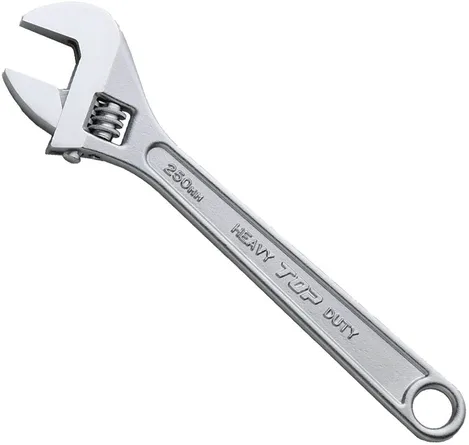
The image shows one adjustable spanner diagonally against a white background. Its head, adjustment screw, handle and end hole are visible together. The operator selected this specific recent job and provided its input and model for public display.
Inspect the actual result
This detailed generation completed on October 3, 2026 and contains 49,806 triangles. The viewer displays that job’s GLB. Internal workflow metadata was removed from the public copy; geometry and textures were preserved. The model loads only when you press the button, avoiding an automatic large download on page entry.
Compare the front and other surfaces
- Match the input angle and compare the open head and full handle silhouette.
- Rotate to the side to inspect thickness, then view surfaces hidden in the source image.
- Zoom in to distinguish geometry from texture details around the adjustment screw, end hole and small lettering.
- Assess both overall shape and fine details. One example does not promise the same quality for every input.
Limits to check before use
This is an image-based generation, not an engineering reconstruction of dimensions, strength or moving parts. For a visual prop, review scale, face count, orientation, materials and relevant rights. Printing or manufacturing needs separate geometry and dimensional review. Providing this example file does not guarantee rights for every commercial use.
Continue reading
doodlelist
Describe the scene you want to create
Structure a doodlelist prompt around the subject, framing, setting and light, then change one element at a time.
Read guide →ropal3d
From one image to a usable 3D model
Choose a source image, select quality, inspect hidden surfaces, align the model and save a GLB in ropal3d.
Read guide →KO-DIT
Help with sign-in, limits and downloads
Understand the two allowance schedules and distinguish login problems, queued work and expired results.
Read guide →