KO-DIT.

KO-DIT · CREATIVE TOOLS

Ideas into images.
Images into dimensions.

A 3D model from a single image.
A picture from a few words.
Find the tool for what you want to create.

Two ways to create, right in your browser

OUR SERVICES

What would you like to create?

Choose ropal3d for 3D assets or doodlelist for images. Open either service to get started.

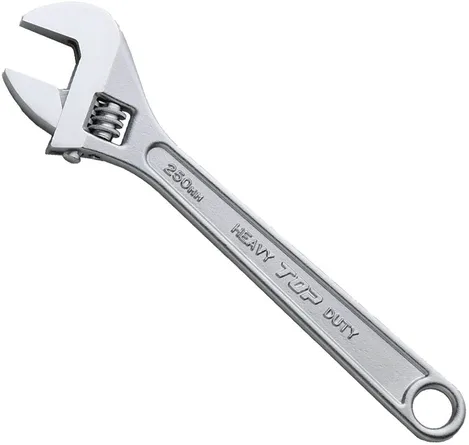
Real example · Spanner
Real example · SpannerAn actual input image provided by the operator. Rotate the generated model on the case page.
01 / IMAGE TO 3DAI 3D modeling

ropal3d

One image. A new dimension.

Upload an image to generate a 3D model. Rotate and zoom to inspect it in your browser, then download a GLB file with textures.

  • Image to 3D
  • Rotate & zoom
  • GLB download

Sign in with Google for up to 10 generations in a rolling 24-hour period. Fast and detailed generations each count as one.

Anime character in warm window light, shown as an art style reference
Imagine in words. Express it in pictures.Art style reference · Results depend on your description and style.
02 / TEXT TO IMAGEAI image creation

doodlelist

Your next scene starts with words.

Describe a character, setting, expression and atmosphere. Choose an available style such as anime, watercolor or crayon, and revisit your images in your history.

  • Text to image
  • Multiple art styles
  • Your image history

Register with Google to create up to 10 images a day. The allowance resets at midnight in Korea. Check the service for current conditions.

QUICK START

Find your starting point.

Start with an image you have, or an idea you can describe.

01

Choose what to create

Open ropal3d for a 3D model or doodlelist for an image. Follow the Google sign-in instructions in the service.

02

Bring an image or a description

For ropal3d, prepare an image showing the whole subject clearly. For doodlelist, describe the scene and the mood you want.

03

Review and use your result

Rotate and zoom your 3D model before saving the GLB. For images, review the result and your history as you refine your idea.

CREATE & LEARN

A practical guide to your next creation

Write clearer doodlelist prompts, prepare images for ropal3d, inspect GLB models and resolve common access problems.

ABOUT KO-DIT

A little less distance
between an idea and a beginning.

KO-DIT introduces two AI tools for expressing ideas through images and 3D. ropal3d turns images into models; doodlelist turns words into pictures.

Explore what each tool offers, then visit the service to create. Each service provides its current conditions and your generated results.

Your imagination leads

You choose the scene and direction. The tools help you make the idea more concrete.

Results deserve a review

AI can produce something unexpected. We value an experience that lets people inspect and try again.

Clear guidance

The service page explains its current features and conditions of use.

GOOD TO KNOW

A few things to know before you start

How are the two services different?

ropal3d takes an image and generates a 3D model you can download as a GLB. doodlelist creates an image from a written description and your chosen art style.

Can I use them for free?

ropal3d currently offers up to 10 generations in a rolling 24-hour period after Google sign-in. doodlelist offers registered Google users up to 10 images daily, resetting at midnight in Korea. Check each service for current conditions.

Can I use the services together?

You can save an image from doodlelist and upload it to ropal3d to try making a 3D model. Start with one subject whose full shape is clearly visible. AI estimates unseen parts, so the model may differ from your intention.

Can I generate something on this website?

This site helps you compare and open the services. Sign-in, generation and results are handled in each service.

What should I check before using a result?

Review the quality and suitability of your result. Check each service’s terms and relevant rights before publishing or using it commercially.

LET’S MAKE IT BETTER

Small feedback can start the next improvement.

Share your feedback about ropal3d or doodlelist. Include the service name, affected screen and device details to help us investigate.

Contact by email

Operated by KO-DIT · Opens your email application.